
Settings
Every setting can be set in two places: the stack environment (a .env file
next to the compose file, or your Docker manager’s environment editor), and
the dashboard’s Settings page - except a few that only the stack
environment can set (see
What stays in the stack environment).
Use the stack environment for secrets, sign-in and anything you want pinned;
use the page for the rest - thresholds, mode, the model, budgets, the
classifier, the notification topic - where a change is checked before it is
saved and usually takes effect at once.
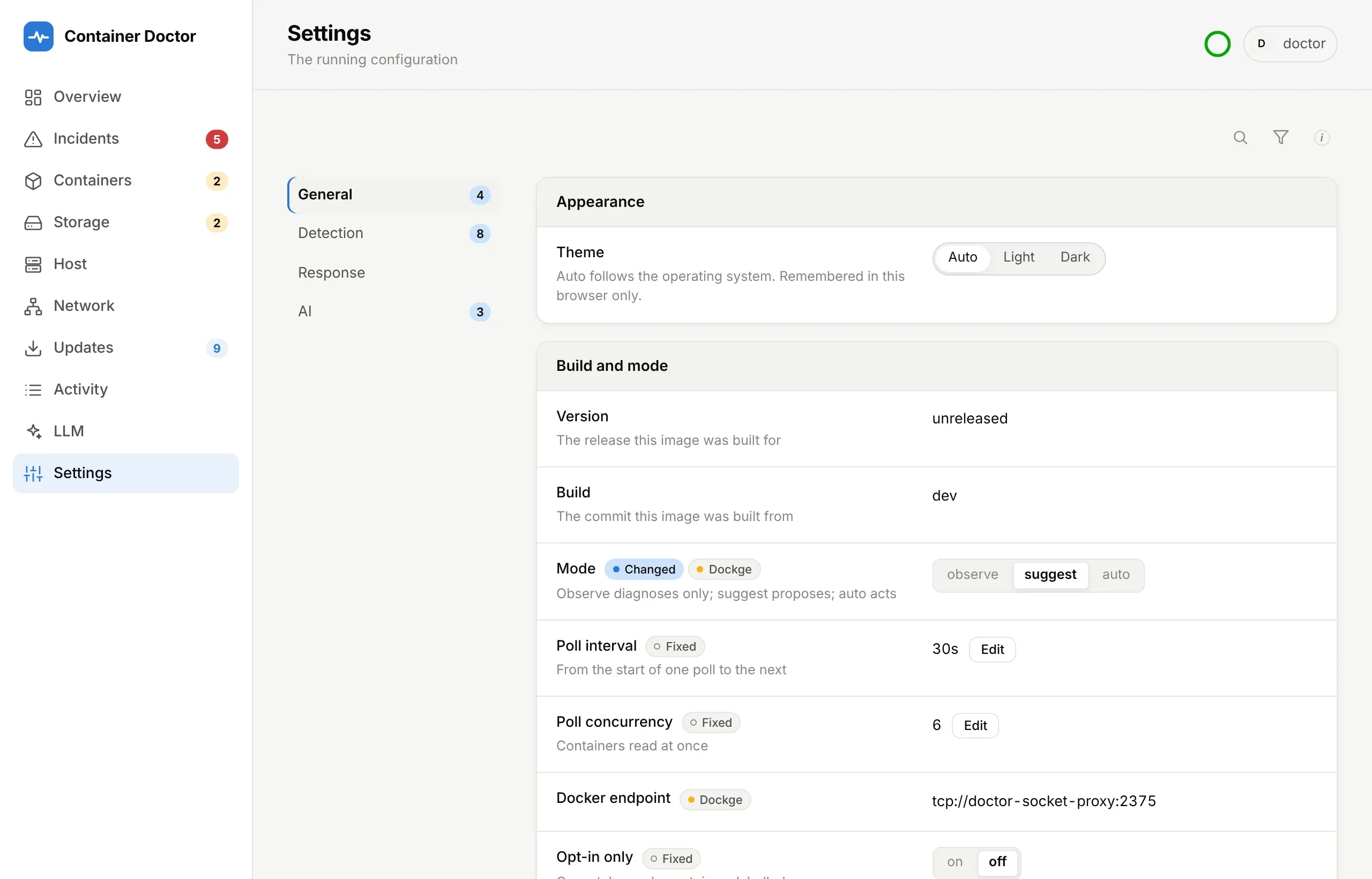
Where a value comes from
Section titled “Where a value comes from”Each setting is read from, in this order:
- The stack environment. A variable set there always wins - so it is also the way back, whatever was saved on the page.
- The Settings page. What was saved there, in the
settingstable of the doctor’s database. - The code’s default, from
app/config.py.
compose.example.yaml passes every setting as ${X:-}, so a variable the
stack environment leaves unset arrives empty, and empty is the same as unset.
That is also how the page knows which settings the stack environment can
reach: the doctor reads the variables it was started with, and a deployment
that passes them through shows each one, empty or not. One that passes only
what it sets (docker run -e, say) shows nothing as fixed, since the page
cannot tell. The only defaults in the compose file describe the deployment -
the socket proxy and the disks. A setting that is on by default (the RAID,
sysfs, Host and SMART paths) is turned off with off; a list is emptied with
none.
The page marks each row by where its value comes from:
| Mark | Means |
|---|---|
Portainer (the DOCTOR_DOCKER_MANAGER name, or stack env) |
set in the stack environment, which overrides the page |
| saved here | saved on this page |
| changed | differs from the default, whoever set it |
| fixed | the deployment does not pass this variable, so the stack environment cannot set it |
| after restart: … | saved, and waiting for a restart to take effect |
A row with no mark is a default, or a fact such as the build. Changed only lists just the changed rows across every tab, and Variables and defaults shows under each row its variables - each marked with where its value comes from - and the row’s default. The search finds variables by name.
Changing a setting
Section titled “Changing a setting”Signed in, any setting the stack environment does not set can be changed on the page:
- A closed set - mode, provider, effort, auto-applied actions, the classifier, any on/off - shows all its choices, the current one highlighted; click another to save it.
- Anything else has edit, with one field per variable of the row (a dropdown where the variable has options).
- reset puts a saved value back to its default.
A value is checked before it is saved. It must read as the setting’s type - an unreadable one would otherwise fall back to the default without a word - and it must not add a configuration problem: auto mode with no sign-in configured, a confidence above 1. Switching to auto mode, or adding an auto-applied action, asks first.
Changes made here, under the legend, lists the last 50 changes saved on the
page: who, when, and from what to what (default is a reset, or a value that
was never saved before). Every change is kept in the setting_changes table.
When a change takes effect
Section titled “When a change takes effect”Most at once. The new settings are handed to every part of the doctor together, and what was built from them - the log pattern, the settle window, the briefing, the classifier’s backend, the call log, the connectivity checks - is built again first, so a change that fails to apply leaves the doctor as it was. Other open tabs refresh their Settings page when it happens.
A few are read only when the doctor starts, and their editor says applies on restart:
- the Docker connection pool (
DOCTOR_POLL_CONCURRENCY) - the Host and RAID detail paths (
DOCTOR_PROC_PATH,DOCTOR_SYSFS_PATH) - the LLM provider
- the internet check interval and the registry check interval
These show as after restart: … until Restart to apply stops the doctor;
Docker’s restart: unless-stopped starts it again a few seconds later with
the saved values.
What stays in the stack environment
Section titled “What stays in the stack environment”The page never saves:
- secrets - API keys, tokens, the web password, the OIDC client secret, the session secret - nor changes a row about one, such as Credentials;
- where a secret is sent: the Docker endpoint (
DOCKER_HOST, fromDOCTOR_DOCKER_HOST), the OpenAI-compatible base URL (DOCTOR_OPENAI_BASE_URL), the classifier’s endpoint (DOCTOR_CLASSIFIER_URL) and the ntfy server (DOCTOR_NTFY_URL). A value saved from the page could otherwise send an API key or token to a host of its choosing. The ntfy topic stays editable; - how sign-in works: every
DOCTOR_OIDC_*setting,DOCTOR_PUBLIC_URL,DOCTOR_SESSION_HOURS,DOCTOR_WEB_USERandDOCTOR_WEB_PASSWORD_FALLBACK. Whoever can save a setting must not be able to decide who signs in, or where; - what is needed before the database opens or the web server starts: the data directory, the web address and port, the log level;
- anything the stack environment already sets, since it would override the page.
To change one of those, change the stack environment and redeploy.
Copying settings to another install
Section titled “Copying settings to another install”Export downloads what was saved on the page as a JSON file - only the saved values, never defaults, the stack environment’s or secrets:
{ "format": "container-doctor-settings", "version": 1, "exported_at": "2026-10-08T09:00:00+00:00", "build": "2716042", "settings": {"DOCTOR_CPU_THRESHOLD": "70", "DOCTOR_EFFORT": "high"}}Import… takes such a file and shows what it would change before anything is
saved. The file is checked as a whole: one unreadable value, or a configuration
problem its values add up to together, refuses all of it. A variable the page
cannot save - a secret, one the stack environment sets, one this version does not know - is
skipped and listed rather than refused. The rest is written in one transaction
and applied like any other save. A file edited by hand may use plain numbers
and true/false.
Getting back to a known state
Section titled “Getting back to a known state”- One setting: reset on the page, or set the variable in the stack environment, which wins over anything saved.
- Everything saved on the page: import a file with
"settings": {}and"replace": truethrough the API, or delete the rows from thesettingstable while the doctor is stopped. - No editing at all:
DOCTOR_SETTINGS_EDITABLE=falsein the stack environment makes the page read-only again - nothing can be saved, reset or imported. What was saved before still applies; set those variables in the stack environment to override them, or clear thesettingstable as above.
Who can change settings
Section titled “Who can change settings”Saving, importing, exporting and Restart to apply need the same sign-in as approvals. Like every other state-changing request, saves and imports are refused when they come from another site’s page (a browser sends a cached Basic-auth password with any request to the site; see Security), and are handled one at a time, so two at once cannot each pass the checks and together leave a combination nobody checked.