
Network
Network shows every Docker network, who is on it and at what address, and
what the host publishes. Membership, addresses and ports come from the
container inspect the poll already does. Driver, the internal flag, subnets
and networks nobody is on come from GET /networks, which the bundled proxy
permits read-only (NETWORKS=1; POST=0 still denies creating, connecting or
removing one). Pointed at a proxy that refuses it, the page still works: unused
networks are missing and internal is inferred from containers getting no
gateway.
- What connects them draws only the containers on two or more networks, wired to those networks. Those are the ones joining segments together — the doctor itself, anything behind Traefik that also talks to its own database.
- Cards (or the matrix, from the layout switch) list every network’s
members. Pointing at a container lights it up on every network it is on. A
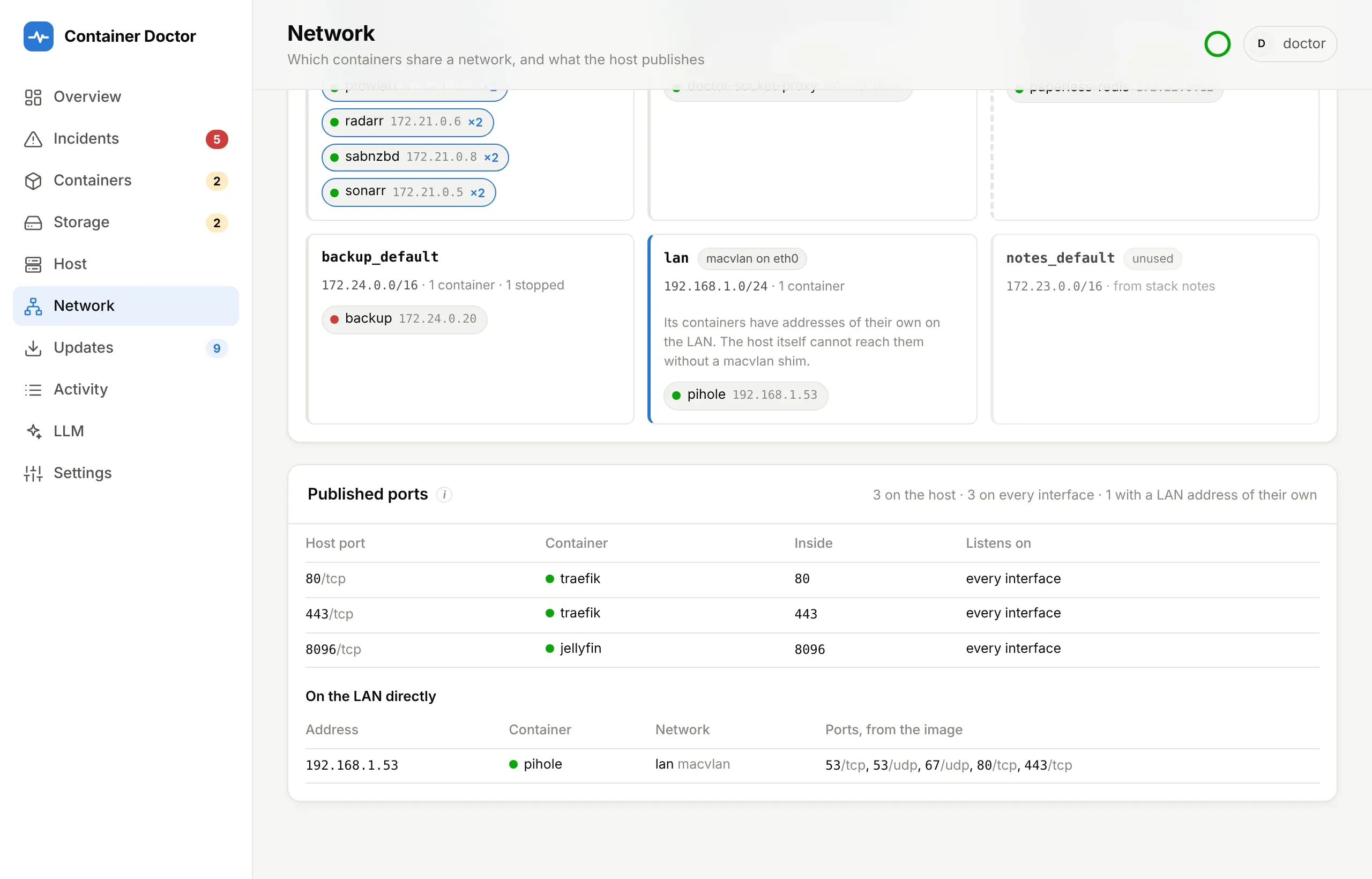
macvlanoripvlancard names its parent interface and says that its containers have addresses of their own on the LAN, which the host itself cannot reach without a shim. - Published ports lists what is bound on the host itself, and whether on
every interface or one address. A running container’s ports come from what
Docker actually bound; only a stopped one shows its configured
ports:instead. A container onmacvlanalone has itsports:ignored by Docker, so nothing of it shows here. - On the LAN directly, below it, lists every container on a
macvlanoripvlannetwork at its own LAN address — a Traefik or Pi-hole reached like a machine of its own, with nothing published on the host. Its ports are what the image’sEXPOSE, compose’sexpose:and the inside half ofports:declare; what really listens there (Traefik’s entrypoints, say) Docker cannot see. Needs Docker’s network list, which names the driver.
It also notes wiring mistakes. None opens an incident:
| Note | When |
|---|---|
traefik.docker.network names a network the container is not on |
Traefik will route to an address it cannot reach — 502/504 |
Routed by Traefik, on several networks, no traefik.docker.network |
Which address Traefik picks is left to chance |
| Behind Traefik and published on every interface | The port skips the proxy’s TLS and sign-in |
On Docker’s default bridge |
No name resolution between containers there |
| Two networks’ subnets overlap | Traffic goes to whichever Docker set up last |
| Nobody is on a network | Left over from a removed stack, or one that is down |
A Traefik started with --providers.docker.network (or
TRAEFIK_PROVIDERS_DOCKER_NETWORK) counts as that label on every container
that has none: they are not called ambiguous, and are warned about when they are
not on that network. The same setting in a mounted traefik.yml cannot be seen,
so there the label is still what settles it.
A note that is meant — a port published on purpose, a network kept for a stack that is down — can be dismissed. It moves under dismissed below the notes, saying who dismissed it and when, and no longer counts towards the page’s warnings. It stays dismissed from poll to poll, kept by what it is about (the kind of note and its container or network), until it is restored there. Like approving an action, it needs a sign-in (a password or OIDC).
Internet and DNS
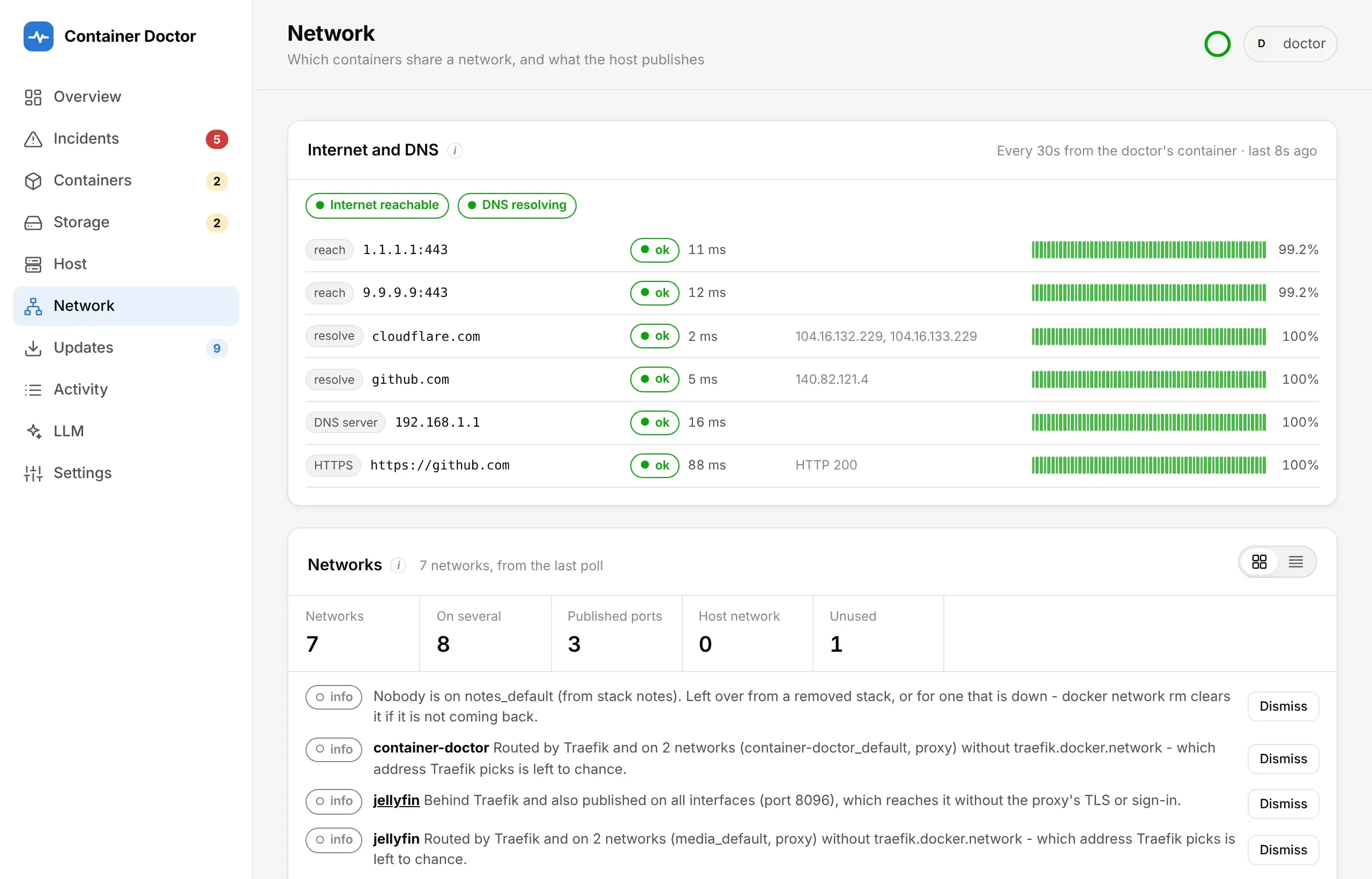
Section titled “Internet and DNS”At the top of the page, checked every minute from the doctor’s own container, which reaches out the way every other container does. Four kinds of check, each answering a different question:
| Check | Default | Failing means |
|---|---|---|
| reach | TCP to 1.1.1.1:443, 9.9.9.9:443 |
All failing: the internet is unreachable. No DNS is involved |
| resolve | cloudflare.com, github.com through the container resolver |
DNS is broken, while the line works |
| DNS server | none; set DOCTOR_NET_DNS_SERVERS |
That one server is down while the others answer |
| HTTPS | https://www.cloudflare.com/cdn-cgi/trace |
That site cannot be fetched, through DNS and TLS |
A DNS server is asked with a hand-built UDP query, so no resolver library and no extra access is needed. List your Pi-hole, AdGuard or router there: a dead local DNS server is the classic “everything is broken” that the line itself does not explain.
A Pi-hole on macvlan on the same host times out at its LAN address: the host
and its bridge containers cannot reach macvlan addresses. Put the doctor on a
bridge network the Pi-hole is also on and list it by container name —
DOCTOR_NET_DNS_SERVERS=pihole — and Docker’s DNS finds its address there.
Each failure is blamed once: no internet explains failing DNS and HTTPS too,
and failing DNS explains failing HTTPS. After DOCTOR_NET_FAIL_ROUNDS (3)
failed rounds in a row an incident opens under host:network, critical for
no internet or no DNS, warning for one server or one site. It closes after
as many good rounds, also across a restart of the doctor. None leads to an
action. Every diagnosis is told whether the host could reach the internet and
resolve names at the time.